Namespaces | |
| namespace | colors |
| ANSI escape codes for terminal colors. | |
| namespace | events |
| namespace | sop_class |
Classes | |
| struct | access_control_config |
| Access control configuration. More... | |
| struct | anonymization_config |
| Anonymization configuration. More... | |
| class | config_loader |
| struct | database_config |
| Database configuration for index storage. More... | |
| struct | image_params |
| Image parameters for test data generation. More... | |
| struct | logging_config |
| Logging configuration. More... | |
| class | mini_pacs |
| struct | mini_pacs_config |
| Configuration options for Mini PACS. More... | |
| struct | mini_pacs_statistics |
| Runtime statistics for Mini PACS operations. More... | |
| struct | monitoring_config |
| Health monitoring configuration. More... | |
| struct | mpps_entry |
| MPPS instance for tracking procedure progress. More... | |
| struct | patient_info |
| Patient information for test data generation. More... | |
| struct | production_config |
| Complete production PACS configuration. More... | |
| class | production_pacs |
| struct | production_statistics |
| Extended statistics for production PACS. More... | |
| struct | rest_api_config |
| REST API server configuration. More... | |
| class | scoped_signal_handler |
| struct | security_config |
| Complete security configuration. More... | |
| struct | server_config |
| DICOM server configuration. More... | |
| class | signal_handler |
| struct | storage_config |
| File storage configuration. More... | |
| struct | study_info |
| Study information for test data generation. More... | |
| class | test_data_generator |
| struct | tls_config |
| TLS security configuration for DICOM connections. More... | |
| struct | worklist_entry |
| Worklist item for MWL queries. More... | |
Functions | |
| auto | supports_color () noexcept -> bool |
| Check if the terminal supports ANSI colors. | |
| void | set_color_enabled (bool enabled) |
| Enable or disable color output globally. | |
| auto | is_color_enabled () noexcept -> bool |
| Check if colors are currently enabled. | |
| void | print_header (std::string_view title) |
| Print a header/title with decorative border. | |
| void | print_section (std::string_view title) |
| Print a section header. | |
| void | print_success (std::string_view message) |
| Print a success message. | |
| void | print_error (std::string_view message) |
| Print an error message. | |
| void | print_warning (std::string_view message) |
| Print a warning message. | |
| void | print_info (std::string_view message) |
| Print an informational message. | |
| void | print_debug (std::string_view message) |
| Print a debug message. | |
| void | print_dataset_summary (const core::dicom_dataset &ds) |
| Print a summary of a DICOM dataset. | |
| void | print_dataset_elements (const core::dicom_dataset &ds, size_t max_value_length=60) |
| Print all elements in a DICOM dataset. | |
| void | print_box (const std::vector< std::string > &lines) |
| Print text in a decorative box. | |
| void | print_table (std::string_view title, const std::vector< std::pair< std::string, std::string > > &rows) |
| Print a key-value table. | |
| void | print_progress (size_t current, size_t total, int width=40, std::string_view label="Progress") |
| Print a progress bar. | |
| void | clear_line () |
| Clear the current line (for updating progress) | |
| auto | format_bytes (uint64_t bytes) -> std::string |
| Format a byte size for human-readable display. | |
| auto | format_duration (uint64_t milliseconds) -> std::string |
| Format a duration in milliseconds. | |
| auto | center_text (std::string_view text, size_t width) -> std::string |
| Center a string within a given width. | |
| auto | truncate (std::string_view text, size_t max_length, std::string_view suffix="...") -> std::string |
| Truncate a string to a maximum length. | |
Function Documentation
◆ center_text()
|
nodiscard |
Center a string within a given width.
- Parameters
-
text The text to center width The total width
- Returns
- Centered string with padding
Definition at line 346 of file console_utils.cpp.
Referenced by print_header().

◆ clear_line()
| void kcenon::pacs::samples::clear_line | ( | ) |
Clear the current line (for updating progress)
Definition at line 302 of file console_utils.cpp.
◆ format_bytes()
|
nodiscard |
Format a byte size for human-readable display.
- Parameters
-
bytes Number of bytes
- Returns
- Formatted string (e.g., "1.5 MB", "256 KB")
Definition at line 310 of file console_utils.cpp.
◆ format_duration()
|
nodiscard |
Format a duration in milliseconds.
- Parameters
-
milliseconds Duration in milliseconds
- Returns
- Formatted string (e.g., "1.5s", "250ms")
Definition at line 331 of file console_utils.cpp.
◆ is_color_enabled()
|
nodiscardnoexcept |
Check if colors are currently enabled.
- Returns
- true if colors are enabled
Definition at line 92 of file console_utils.cpp.
References supports_color().

◆ print_box()
| void kcenon::pacs::samples::print_box | ( | const std::vector< std::string > & | lines | ) |
Print text in a decorative box.
- Parameters
-
lines Vector of text lines to display
Example output: ┌─────────────────────────────────┐ │ Line 1 │ │ Line 2 │ └─────────────────────────────────┘
Definition at line 228 of file console_utils.cpp.
References color, kcenon::pacs::samples::colors::dim, kcenon::pacs::samples::colors::reset, and truncate().
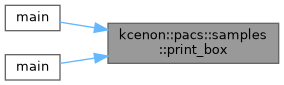
Referenced by main(), and main().

◆ print_dataset_elements()
| void kcenon::pacs::samples::print_dataset_elements | ( | const core::dicom_dataset & | ds, |
| size_t | max_value_length = 60 ) |
Print all elements in a DICOM dataset.
- Parameters
-
ds The dataset to display max_value_length Maximum length for value display (truncated if longer)
Displays all elements with tag, VR, and value.
Definition at line 201 of file console_utils.cpp.
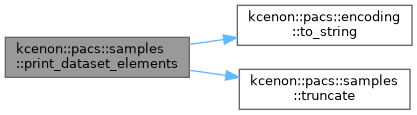
References kcenon::pacs::samples::colors::bold, color, kcenon::pacs::samples::colors::cyan, kcenon::pacs::samples::colors::reset, kcenon::pacs::encoding::to_string(), truncate(), and kcenon::pacs::samples::colors::yellow.
◆ print_dataset_summary()
| void kcenon::pacs::samples::print_dataset_summary | ( | const core::dicom_dataset & | ds | ) |
Print a summary of a DICOM dataset.
- Parameters
-
ds The dataset to summarize
Displays key patient, study, series, and image information in a formatted table.
Definition at line 164 of file console_utils.cpp.
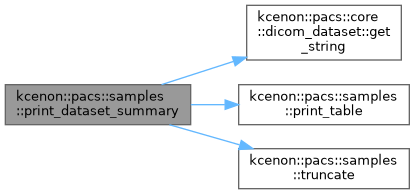
References kcenon::pacs::core::dicom_dataset::get_string(), print_table(), and truncate().
◆ print_debug()
| void kcenon::pacs::samples::print_debug | ( | std::string_view | message | ) |
Print a debug message.
- Parameters
-
message The message text
Prints with dim/gray color.
Definition at line 155 of file console_utils.cpp.
References color, kcenon::pacs::samples::colors::dim, and kcenon::pacs::samples::colors::reset.
◆ print_error()
| void kcenon::pacs::samples::print_error | ( | std::string_view | message | ) |
Print an error message.
- Parameters
-
message The message text
Prints with red color and X symbol.
Definition at line 140 of file console_utils.cpp.
References color, kcenon::pacs::samples::colors::red, and kcenon::pacs::samples::colors::reset.
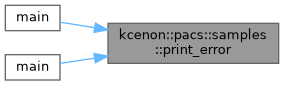
Referenced by main(), and main().
◆ print_header()
| void kcenon::pacs::samples::print_header | ( | std::string_view | title | ) |
Print a header/title with decorative border.
- Parameters
-
title The title text
Example output: ╔══════════════════════════════════════════════════════════════════════════╗ ║ PACS System Sample Application ║ ╚══════════════════════════════════════════════════════════════════════════╝
Definition at line 118 of file console_utils.cpp.
References kcenon::pacs::samples::colors::bold, center_text(), color, kcenon::pacs::samples::colors::cyan, and kcenon::pacs::samples::colors::reset.
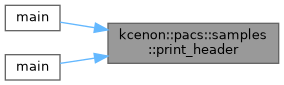
Referenced by main(), and main().

◆ print_info()
| void kcenon::pacs::samples::print_info | ( | std::string_view | message | ) |
Print an informational message.
- Parameters
-
message The message text
Prints with cyan color and info symbol.
Definition at line 150 of file console_utils.cpp.
References color, kcenon::pacs::samples::colors::cyan, and kcenon::pacs::samples::colors::reset.
Referenced by main().

◆ print_progress()
| void kcenon::pacs::samples::print_progress | ( | size_t | current, |
| size_t | total, | ||
| int | width = 40, | ||
| std::string_view | label = "Progress" ) |
Print a progress bar.
- Parameters
-
current Current value total Total value width Width of the progress bar in characters label Optional label to display
Example output: Processing: [████████████░░░░░░░░] 60% (6/10)
Definition at line 278 of file console_utils.cpp.
References color, kcenon::pacs::samples::colors::dim, kcenon::pacs::samples::colors::green, and kcenon::pacs::samples::colors::reset.
◆ print_section()
| void kcenon::pacs::samples::print_section | ( | std::string_view | title | ) |
Print a section header.
- Parameters
-
title The section title
Example output: ─── Configuration ───────────────────────────────────────────────────────────
Definition at line 127 of file console_utils.cpp.
References kcenon::pacs::samples::colors::blue, kcenon::pacs::samples::colors::bold, color, and kcenon::pacs::samples::colors::reset.
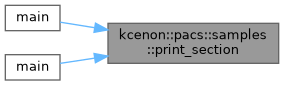
Referenced by main(), and main().
◆ print_success()
| void kcenon::pacs::samples::print_success | ( | std::string_view | message | ) |
Print a success message.
- Parameters
-
message The message text
Prints with green color and checkmark symbol.
Definition at line 135 of file console_utils.cpp.
References color, kcenon::pacs::samples::colors::green, and kcenon::pacs::samples::colors::reset.
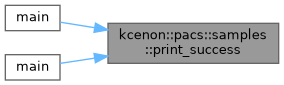
Referenced by main(), and main().
◆ print_table()
| void kcenon::pacs::samples::print_table | ( | std::string_view | title, |
| const std::vector< std::pair< std::string, std::string > > & | rows ) |
Print a key-value table.
- Parameters
-
title Table title rows Vector of {key, value} pairs
Example output: ┌─ Patient Information ───────────┐ │ Name: DOE^JOHN │ │ ID: PAT001 │ │ Sex: M │ └─────────────────────────────────┘
Definition at line 250 of file console_utils.cpp.
References kcenon::pacs::samples::colors::bold, color, kcenon::pacs::samples::colors::dim, kcenon::pacs::samples::colors::magenta, and kcenon::pacs::samples::colors::reset.
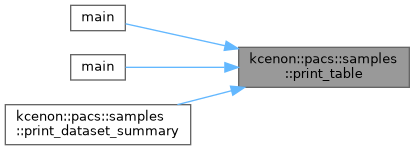
Referenced by main(), main(), and print_dataset_summary().
◆ print_warning()
| void kcenon::pacs::samples::print_warning | ( | std::string_view | message | ) |
Print a warning message.
- Parameters
-
message The message text
Prints with yellow color and warning symbol.
Definition at line 145 of file console_utils.cpp.
References color, kcenon::pacs::samples::colors::reset, and kcenon::pacs::samples::colors::yellow.
◆ set_color_enabled()
| void kcenon::pacs::samples::set_color_enabled | ( | bool | enabled | ) |
Enable or disable color output globally.
- Parameters
-
enabled Whether to enable colors
When disabled, all color functions will output plain text.
Definition at line 87 of file console_utils.cpp.
◆ supports_color()
|
nodiscardnoexcept |
Check if the terminal supports ANSI colors.
- Returns
- true if ANSI colors are supported
Checks environment variables and terminal type to determine support.
Definition at line 41 of file console_utils.cpp.
Referenced by is_color_enabled().

◆ truncate()
|
nodiscard |
Truncate a string to a maximum length.
- Parameters
-
text The text to truncate max_length Maximum length suffix Suffix to add when truncated (default: "...")
- Returns
- Truncated string
Definition at line 356 of file console_utils.cpp.
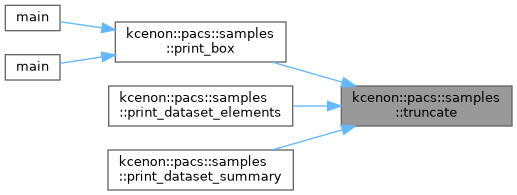
Referenced by print_box(), print_dataset_elements(), and print_dataset_summary().